On this page
Before you start
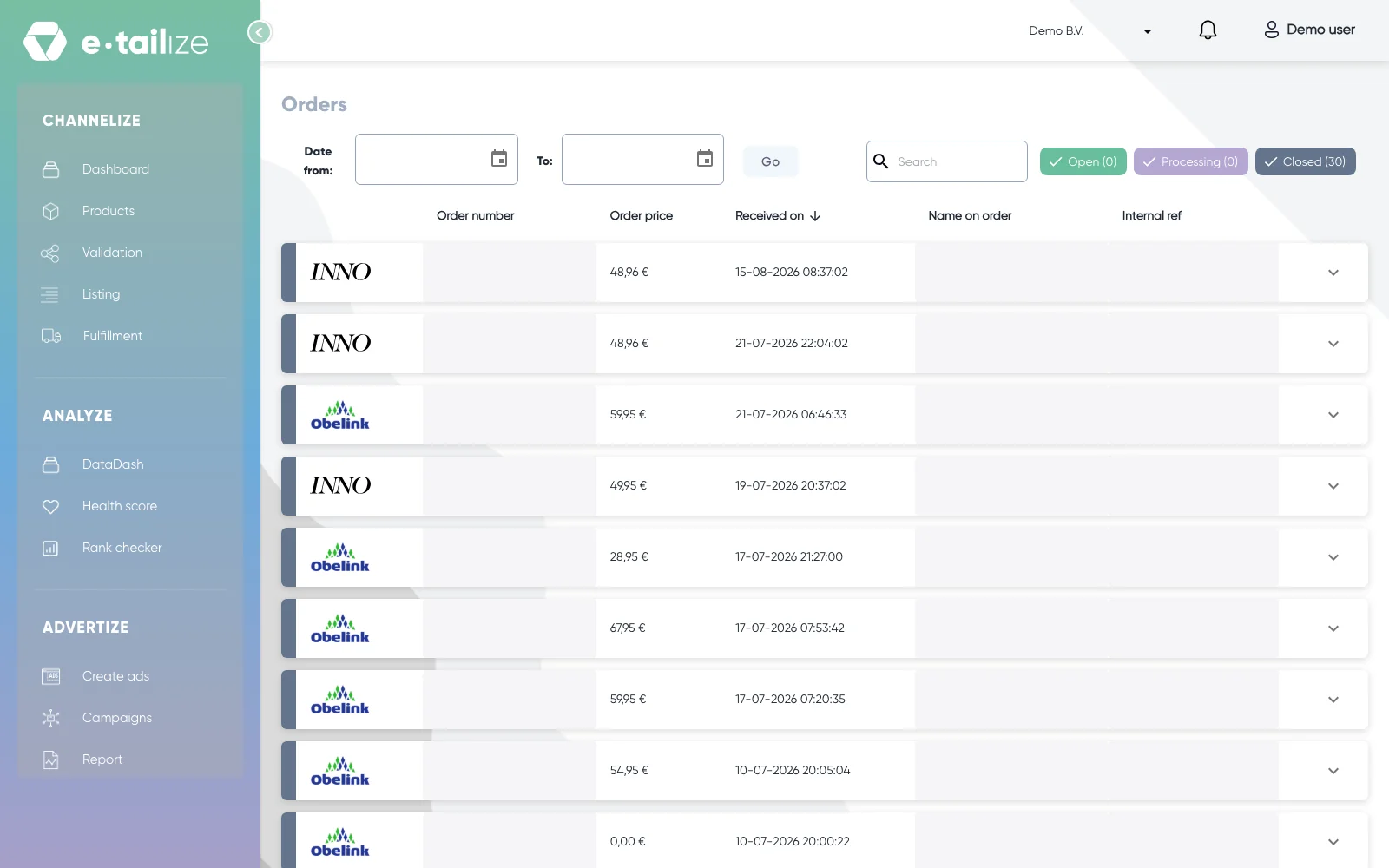
Click "Fulfillment" in the left sidebar and then "Orders". The page is headed "Orders" and holds every order e-tailize received from the marketplaces you connected, one row per order, newest first. Nothing stands here until at least one marketplace connection is live.
What happens next
The bar above the list narrows it down. "Date from:" and "To:" open a calendar, and "Go" applies the range you picked. The "Search" box filters the rows, by an order number for example.
Three status buttons follow, each with its own count between brackets: "Open", "Processing" and "Closed". Open is an order you still have to fulfil, Processing is one being processed, Closed is a fulfilled order. Every button is a toggle, so clicking it hides that group and clicking it again brings it back. The coloured bar on the left of a row shows the same status.
The list itself carries the marketplace logo and the columns "Order number", "Order price", "Received on", "Name on order" and "Internal ref". "Internal ref" shows the same value as the marketplace order number, so both columns match.
Open an order with the arrow button at the end of its row. On the left three tabs: "Billing details" holds the buyer's billing address and "Payment status", the status the marketplace itself reports. "Shipping details" holds the delivery address. "Order details" lists the items, with "Quantity" and "Shipped" per line.
On the right stands the panel "Fulfil order". "Fulfill" registers a shipment you send yourself: pick the "Transport carrier", type the "Track and trace code" and click "Send". "My parcel" creates a shipping label instead.
Common problems
An order you expect is not here. Forwarding and processing run in the background, so look again after the next run. Then type the order number in the "Search" box, and check the date range as well, because "Date from:" and "To:" plus "Go" can hide the row. Still nothing? Then the marketplace has not delivered the order to e-tailize. Is the order here but missing further on? Read Check why your orders are not coming through.
The buyer's e-mail address looks odd. Marketplaces usually pass on an anonymised relay address rather than the buyer's own mailbox, so contact keeps running through the marketplace.
FAQ
What do "Open", "Processing" and "Closed" mean?
"Open" is an order that still has to be fulfilled, "Processing" one that is being processed, "Closed" a fulfilled order. A group you hid with its button counts zero while it is hidden.
Can I ship part of an order?
Yes. In the "Fulfil order" dialog every item that is not shipped in full yet has an "Amount" dropdown, from zero up to the quantity still open. Items already shipped in full move to a "Shipped items" block without a dropdown. The "Shipped" column under "Order details" keeps the count.
Do I have to close an order by hand?
Not when your webshop ships it and track and trace flows back to the marketplace. Forward orders and keep track and trace flowing sets that up.
Related
Was this useful?